
MTMIS Punjab provides an online facility for checking registered vehicle details through the Punjab Excise & Taxation Department. The online vehicle verification service allows users to enter a vehicle registration number and view available registration information. This service can help buyers check a used vehicle before completing a purchase.
The online record can provide useful details related to the vehicle, owner information and tax position. Buyers can compare these details with the vehicle documents and physical vehicle before proceeding with a transaction.
What Is MTMIS Punjab?
MTMIS refers to the Motor Transport Management Information System used for motor vehicle records and services in Punjab.
Punjab Excise provides several vehicle-related services through its online system, such as:
- Online verification of registered vehicles
- Vehicle registration
- Post-registration services
- Vehicle ownership transfer
- Motor vehicle tax services
- Number plate services
- E-registration card services
- Motor vehicle tax calculation
The system connects vehicle records with services handled by the Punjab Excise & Taxation Department.
MTMIS Punjab Vehicle Verification Online
The Punjab Excise online portal provides an Online Verification of Registered Vehicles service. A vehicle registration number can be entered to retrieve available information from the relevant record.
For a used vehicle buyer, this check can provide useful information before a sale.
| Vehicle Information | Purpose |
| Registration number | Identifies the registered vehicle |
| Vehicle make | Helps confirm the vehicle manufacturer |
| Chassis number | Helps match the vehicle record |
| Owner information | Helps check the registered owner |
| Tax position | Provides available tax information |
| Vehicle status | Helps with registration-related checks |
The information shown can depend on the available record and the service being accessed.
How to Check Vehicle Verification Online in Punjab
After a long time, the government has changed the system of vehicle registration because if we talk about a few months ago people did the vehicle registration when they were bought and they visited again and again for the status of registration. But now all processes have been converted online and people can check their registration status check at home just provide some information and your vehicle registration process will appear on their screen.
NOTE: MTMIS Punjab Vehicle Verification online has been introduced by the excise department as well as in the below step-by-step procedure listed with images.
| Step No. 1 | Open this Web URL “Click Here |
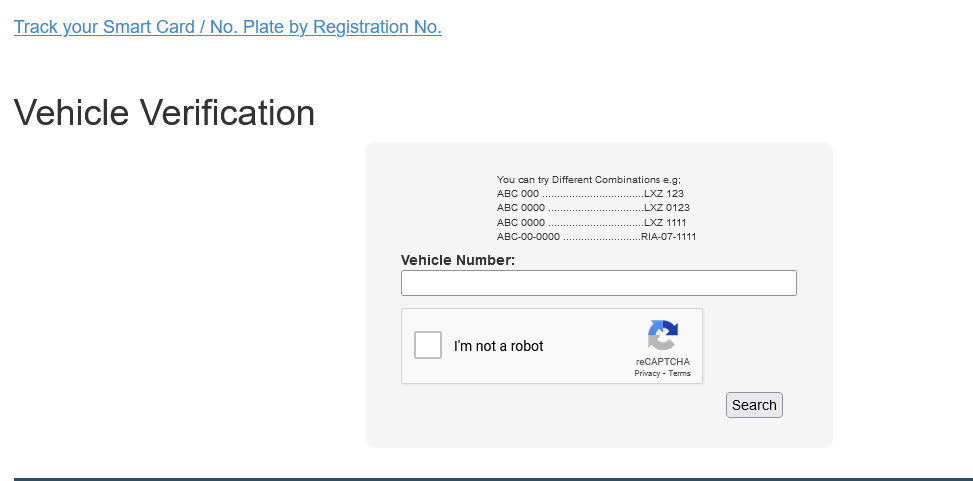
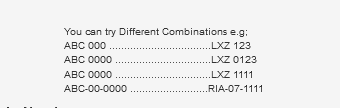
| Step No. 2 | Give the info according to the below Format |
| Step No. 3 | After entering the complete details your vehicle registration will show on your screen. |
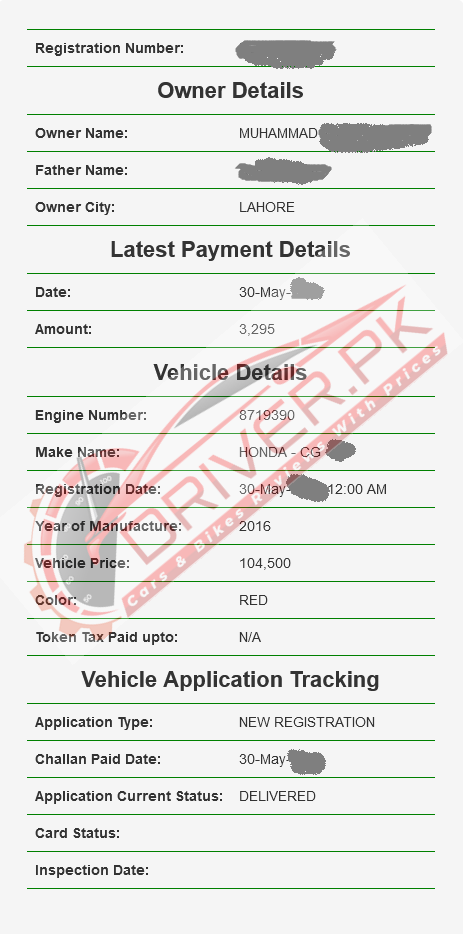
Every vehicle that is registered either commercial or private has a registration number, registration book, and number plate. According to reliable sources, Islamabad will also introduce that system.
Here is the process of vehicle registration in Punjab, KPK, and Sindh Provinces. This is particularly helpful for those people who are unable to verify any vehicle they are going to buy that is registered from any province. This is also beneficial to stop the fraud and purchasing of illegal vehicles. This is also beneficial to stop the fraud and purchasing of illegal vehicles.
MTMIS Punjab Online Vehicle Verification (Excise.punjab.gov.pk
If you have bought a new vehicle or used one and transferred from the excise office now check the transfer status online.
- Firstly, Open the official page of Excise Punajb “https://mtmis.excise.punjab.gov.pk/“.
- Give the information about the vehicle according to the excise format that is mentioned.
- Then click on the enter button.
- Within a few minutes, your complete details will show on your screen.
Vehicle Registration Check Punjab by CNIC
| Step No. 1 | Open the “https://excise.gos.pk/vehicle/vehicle_search_by_cnic” |

| Step No. 2 | Enter the CNIC number in Bucket and then click on the Submit option. |
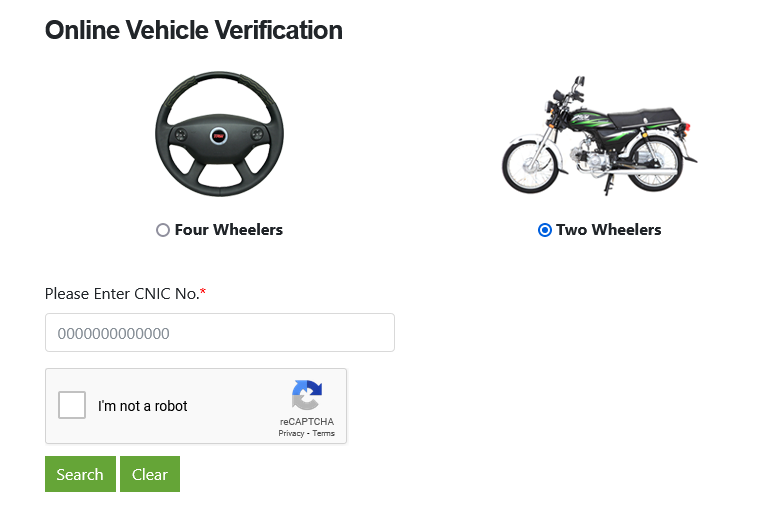
Punjab Vehicle Verification by CNIC
Now, people are looking at the Punjab Vehicle Verification by CNIC but till now they have not introduced any procedure. People will write the CNIC number along with the Vehicle Number Plate and year. Then complete details about your vehicle will show on your screen.
What Details Can MTMIS Verification Show?
The vehicle record can provide several registration-related details. The available information can vary based on the vehicle record and the service being used.
Details may cover:
- Registration number
- Vehicle make
- Chassis number
- Current owner information
- Tax position
- Registration status
These details can help a buyer perform an initial record check before purchasing a used vehicle.
Why Check a Vehicle Before Buying?
An online verification check gives a buyer another way to review vehicle information before making a payment.
Before buying a used vehicle, check:
- Registration number
- Chassis number
- Owner information
- Tax position
- Original registration documents
- Vehicle number plate
- Physical chassis markings
- Seller identification documents
The online record should match the physical vehicle and documents. Any difference deserves further checking before the transaction.
What to Do If Vehicle Details Do Not Match
A mismatch between the online record, vehicle documents and physical vehicle deserves attention before a sale.
You can take these steps:
- Check the registration number again.
- Compare the chassis number with the documents.
- Ask the seller for original documents.
- Check the vehicle physically.
- Contact the relevant Excise office.
- Request clarification before making payment.
Avoid completing a vehicle purchase until the discrepancy has been resolved.
Can MTMIS Show Vehicle Tax Information?
Vehicle tax information forms part of the data used in the Punjab Excise vehicle ownership-transfer process. The available tax position can help a buyer identify possible outstanding tax-related issues.
Punjab Excise also provides a motor vehicle tax calculator through its online services.
Checking tax information before a vehicle transfer can help prevent unexpected costs during the transaction.
MTMIS Punjab and Vehicle Ownership Transfer
Vehicle verification and ownership transfer are separate processes.
The verification service helps users check available vehicle information. Ownership transfer requires the formal procedure set by Punjab Excise and the required documents.
The ePay-based ownership transfer process uses the vehicle registration number to retrieve relevant vehicle information before the transfer process moves forward.
A successful online vehicle verification does not mean that ownership has already transferred to a new buyer.
Documents to Check During a Vehicle Purchase
A used-vehicle buyer should check the available documents before completing a transaction.
Important records can include:
- Original registration document
- Seller’s CNIC
- Vehicle registration number
- Chassis number
- Sale or transfer documents
- Tax information
- Vehicle inspection details
For vehicle registration, Punjab Excise requires documents such as Form-F, owner’s CNIC, original sales certificate, original sales invoice and applicable fees and taxes, depending on the registration case.
MTMIS Punjab Online Verification Problems
Sometimes a vehicle record may not appear during an online search. A typing mistake, record issue or temporary system problem can cause this result.
Try the following:
- Recheck the registration number.
- Enter the number exactly as shown on the vehicle documents.
- Submit the search again.
- Check the physical registration plate.
- Compare the information with the available documents.
- Contact Punjab Excise for assistance if the record remains unavailable.
Punjab Excise provides a general enquiry number for assistance with its services.
Punjab Excise Vehicle Services
The Punjab Excise & Taxation Department provides several motor vehicle services through its online platform.
These services cover areas such as:
- Registered vehicle verification
- Vehicle registration
- Vehicle ownership transfer
- Post-registration services
- Motor vehicle tax
- Tax calculation
- Number plate services
- E-registration services
Using the official Punjab Excise platform can help users access vehicle-related services without relying on unofficial vehicle-checking websites.
MTMIS Punjab vehicle verification can provide useful registration information before buying a used car, motorcycle or another registered vehicle. Check the registration number, chassis number, owner information and available tax details before moving forward.
Also compare the online record with the original vehicle documents and the physical vehicle. For ownership transfer, follow the official Punjab Excise procedure and submit the required documents.
What is MTMIS Punjab used for?
MTMIS Punjab supports motor vehicle records and related services handled by the Punjab Excise & Taxation Department. Its online vehicle verification service allows users to check available registration information.
How can I verify a Punjab vehicle online?
Visit the Punjab Excise website, open the online registered-vehicle verification service, enter the vehicle registration number and submit the search.
Can I check a vehicle before buying it?
Yes. Online vehicle verification can help you review available registration details before purchasing a used vehicle.
Can I check vehicle tax information?
Vehicle tax position forms part of the information used in the Punjab Excise ownership-transfer process. Available tax information can help buyers review possible tax-related issues.
What if the MTMIS record does not match the vehicle?
Recheck the registration number and chassis number. Compare the online information with the original documents and physical vehicle. Contact Punjab Excise for clarification before completing the transaction.
Does MTMIS verification transfer vehicle ownership?
No. Vehicle verification and ownership transfer are separate services. A buyer must follow the formal Punjab Excise ownership-transfer procedure to register the vehicle in the new owner’s name.
